Planning a karaoke party for kids ages 5–12? Here’s what you need to know:
- Why Karaoke? It boosts confidence, encourages social interaction, and is pure fun for kids.
- Prep Timeline: Start 2 weeks in advance. Pick a theme, create a song list (200+ tracks), and ensure equipment is ready.
- Budget Breakdown:
- Low-cost: $20–$50 (basic mic and free apps).
- Mid-range: $230–$500 (karaoke machine, wireless mics, PA speaker).
- High-end: $950+ (pro setup).
- Party Schedule: 2–4 hours with group warm-ups, solo performances, games, and snack breaks.
- Themes: Pop Star Night, Disney Sing-Along, or Movie Musicals for added excitement.
- Snacks & Drinks: Easy-to-eat items like popcorn, fruit skewers, and shaped sandwiches. Avoid sticky or messy options.
With a little planning, you’ll create a party where every child feels like a star. Keep reading for detailed tips on equipment, games, and more!
How to Plan a Kids Karaoke Party
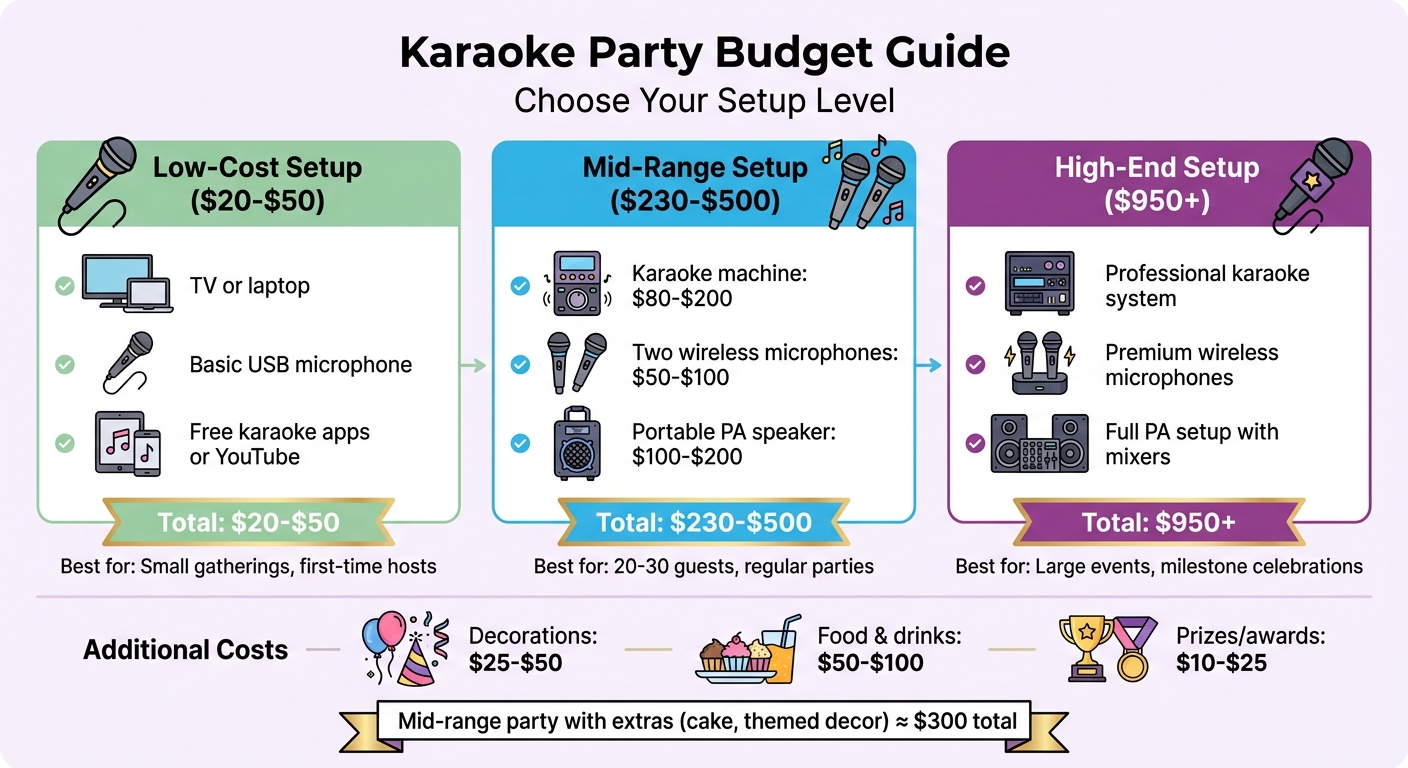
Kids Karaoke Party Budget Breakdown: Equipment Costs by Setup Level
Start preparing about two weeks in advance by locking in the date, deciding on a theme, and ensuring you have the right equipment ready to go. Aim for a guest list of 8–15 kids. This keeps the group small enough for everyone to have a few turns at the mic while still maintaining an energetic vibe. A party lasting 3–4 hours can typically accommodate 25–35 performances, keeping wait times short.
Build a song library of around 200 tracks that include Disney classics, current pop hits, and timeless kids’ favorites. If you can’t find a specific song on standard karaoke apps, tools like StemSplit or MyKaraoke Video can help you create custom backing tracks by removing vocals from audio files. This way, no one has to settle for second-choice songs.
Safety is key. Position screens at eye level, keep the volume between 70–75 dB (since sound levels above 85 dB can be harmful), and use wireless microphones designed for kids. Make sure volume controls are secure and have a backup playlist, like one on YouTube, ready in case your system glitches.
Once these essentials are covered, you can focus on setting a budget that aligns with your vision for the party.
Setting Your Party Budget
Your budget will depend on the equipment you already have. For a low-cost setup, you can use your TV or laptop with a basic USB microphone and free karaoke apps or YouTube, which might cost between $20 and $50. A mid-range setup, costing $230–$500, could include a karaoke machine ($80–$200), two wireless microphones ($50–$100), and a portable PA speaker ($100–$200). If you’re going all out, professional setups start at $950 and include high-end systems, premium microphones, and a full PA setup with mixers.
Don’t forget to factor in other expenses like decorations ($25–$50), food and drinks ($50–$100 for kid-friendly snacks like popcorn, fruit skewers, and cheese cubes), and small prizes or awards to make every child feel special. Avoid sticky candies or chocolate, as they can damage microphones. For a mid-range party, including extras like a custom cake and themed decor, you’re looking at around $300.
Building Your Party Schedule
A 2-hour party works well for kids aged 5–12, offering enough time for fun without exhausting young voices. Start with a 15-minute arrival window, playing background music, and spend 10 minutes explaining the setup and rotation rules.
Get things rolling with a group warm-up song about 20 minutes in. Choose something familiar, like "Happy Birthday" or a popular Disney tune, to encourage participation without putting shy kids on the spot.
Plan the first round of singing from 0:30 to 0:50, then give the kids a 10-minute break for games like Musical Statues or Lyric Fill-in-the-Blank. At the 1-hour mark, take a break for food and cake, then dive back into more performances until the final group number at 1:40. Wrap things up by handing out prizes like "Rising Star" or "Best Dancer" awards, ensuring every child leaves feeling celebrated.
To keep things fair, implement a "one song per round" rule, so each child gets a turn before anyone sings again. This keeps the rotation smooth and prevents anyone from monopolizing the mic.
Karaoke Party Theme Ideas
Planning a karaoke party with a theme can make the event way more fun and memorable. A theme helps guide everything – song choices, costumes, and even the decorations. Here are three fun ideas to get you started:
Pop Star Night transforms your living room into a full-blown concert stage. Kids can dress up as their favorite artists, like Taylor Swift, Katy Perry, or Olivia Rodrigo. Set up a performance area with star-shaped balloons, garlands, and a photo backdrop with DIY photo booth props for those "red carpet" moments. This theme is ideal for kids aged 8-10 and works best with energetic hits like "Shake It Off", "Roar", and "Uptown Funk." These songs are perfect for dancing and keeping the energy high.
Disney Sing-Along is a hit with younger kids, especially those aged 4-7, who seem to know every lyric to songs from Frozen, Moana, and Encanto. The familiarity of these tracks helps build confidence, making it easier for little ones to grab the mic. Add some musical note decorations and hand out tambourines or shakers so everyone can participate – even when they’re not singing. Crowd-pleasers like "Let It Go", "How Far I’ll Go", and "Hakuna Matata" keep the vibe cheerful and fun.
Movie Musical Party brings a touch of drama and theatrical flair. Focus on songs from The Greatest Showman, High School Musical, and similar musicals. Create a "backstage" area stocked with costume accessories and props for kids to get into character. For extra fun, use echo or voice-changing microphones to add a dramatic touch. Songs like "A Million Dreams" and "This Is Me" are perfect for kids who love emotional, storytelling-style performances.
To make the event even more special, use a "Now Playing" sign to announce each act. Hand out awards like "Rising Star" or "Drama Queen/King" to celebrate every performance and make every kid feel like a star.
Song Lists for Kids
With your party schedule and themes all set, the right playlist can take the fun to the next level. Picking songs that kids already know and love is key to a successful karaoke party. Think radio hits, movie soundtracks, or even viral TikTok tunes. These curated song ideas are designed to match your party vibe and keep the energy flowing.
Current Pop Songs for Kids
Modern pop hits are a hit with kids, especially when they’re fun and familiar. Stick to KIDZ BOP versions of popular songs to ensure lyrics are age-appropriate and engaging. For instance, the KIDZ BOP version of Sabrina Carpenter’s "Espresso" is a favorite in 2026, thanks to its catchy rhythm and TikTok dance trend. Another great pick is "APT." by Rosé and Bruno Mars – its repetitive, chant-like structure makes it perfect for kids aged 8 to 11. Chappell Roan’s "HOT TO GO!" (KIDZ BOP version) comes with built-in choreography, making it ideal for getting even the shyest kids involved. For a slower pace, Benson Boone’s "Beautiful Things" offers a melody that’s easy to sing along with. Movie soundtracks are always a win too – songs like "Zero to Hero" from A Minecraft Movie and "Zoo" from Zootopia 2 connect with gaming and movie-loving kids, making them instant hits.
Classic Kids’ Favorites
Some songs just never go out of style and work for any age group. "Baby Shark" by Pinkfong is still a global sensation, with its simple hand motions and catchy tune – perfect for younger kids (ages 4-7). Taylor Swift’s "Shake It Off" and Katy Perry’s "Roar" are empowering crowd-pleasers with easy choruses that are great for group singing. Justin Timberlake’s "Can’t Stop the Feeling" from Trolls and Pharrell Williams’ "Happy" are high-energy tracks that get everyone dancing. For a nostalgic twist, "YMCA" by the Village People and "Dancing Queen" by ABBA are perfect for multi-generational fun, encouraging both kids and parents to join in. Keep individual performances under 3 minutes to hold attention and keep the party moving.
Disney Songs
Disney songs are a karaoke staple because kids know every lyric by heart. "Let It Go" from Frozen and "How Far I’ll Go" from Moana are perfect for confident solo performances. For a group number, "We Don’t Talk About Bruno" from Encanto is a great choice – it’s fun, familiar, and lets shy kids join in without pressure. Classic tracks like "A Whole New World" from Aladdin and "Hakuna Matata" from The Lion King appeal to both kids and parents, creating a shared experience. To ensure everyone gets a turn, set a rule that each child sings once before anyone gets a second turn – this keeps the event fair and on track.
Karaoke Equipment and Setup
The right equipment can make or break your karaoke party. To ensure a fun and memorable event, you’ll need three essential components: a screen to display lyrics (like a TV or laptop), a sound system (such as a Bluetooth speaker or PA system), and microphones. Start with the basics, and you can always upgrade depending on your budget and the size of your gathering.
What Equipment You’ll Need
For a party with 20-30 guests, a mid-range setup is ideal. This might include a karaoke machine like the Singing Machine, two wireless microphones for duets, and a portable PA speaker. You can get everything for about $150-$300. Wireless microphones are especially handy for younger kids (ages 4-7) since they eliminate tripping hazards and allow kids to move around freely while singing. Look for microphones with fun features like echo or voice-changing effects to keep kids engaged.
Keep the volume between 70-75 dB to protect young ears, and make sure the volume knob is out of reach of kids during the party. For lyrics, connect your laptop or tablet to a TV using an HDMI cable for a reliable display. Position the screen at your child’s eye level and use large, easy-to-read fonts to make it more accessible.
DIY Apps vs. Professional Equipment
If you’re hosting a smaller gathering of 8-15 kids, karaoke apps like Smule, KaraFun (around $7/month), or YouTube Kids are budget-friendly options. These work seamlessly with a smart TV and a Bluetooth speaker, keeping costs under $100.
For larger groups of 20+ kids, professional equipment provides better sound quality and more control. With a professional PA system, you can adjust microphone and music volumes separately and even add effects like reverb or echo, which kids love because it makes them sound more polished. If you’re planning a milestone event or hosting at a venue, consider investing in professional gear (starting around $400) for an easier setup and premium sound.
A hybrid approach can also work well: use apps like KaraFun or Singa on your laptop and connect to a rented PA system. This gives you access to a large song library while delivering high-quality sound.
Setting Up Your Karaoke Station
A well-organized setup can elevate the entire experience. Designate a performance area using a colorful rug or mat to create a "stage." Add string lights or a small disco ball to give kids that superstar vibe. This kind of setup not only keeps things organized but also ties into your party theme, making it even more exciting. To avoid microphone feedback, ensure singers stand in front of the speakers, not beside or behind them.
Keep power cables and HDMI cords away from the performance area to prevent accidents. Set up a "backstage" prep zone with props like feather boas, oversized sunglasses, and inflatable guitars so kids can get into character before their turn. Manage the song queue with a physical notebook or a shared digital document to keep things running smoothly and ensure everyone gets a turn. Do a full sound check at least an hour before the party starts to test microphone batteries and verify that lyrics sync properly with the music.
Decorations and Party Add-Ons
DIY Karaoke Decorations
Turn your space into a mini concert venue without breaking the bank. Start by creating a stage area – lay down a colorful rug or mat and frame it with string lights or garlands for that concert-like vibe. Add a fun touch with a "Now Playing" sign to highlight each performer.
To enhance the theme, use star-shaped balloons and musical note cutouts. Hang them on walls, suspend them from the ceiling, or group them around the stage area. For table decorations, fill glass jars with colorful candy or craft mini microphones using foil-wrapped cardboard. Want a retro twist? Scatter vinyl records and cassette tapes around the room. For a modern pop star feel, neon signs can be a great addition.
Set up an interactive photo booth to keep the kids entertained between performances. Use a backdrop and props like inflatable guitars, oversized sunglasses, and feather boas for fun, shareable moments. To take the atmosphere up a notch, add a disco ball and color-changing LED lights, giving kids the feeling of performing on a real stage. Keep food and drinks at the room’s edges to leave plenty of space for dancing.
For even more fun, include some interactive elements to keep the energy going.
Adding Entertainment from Bouncy Rentals
Complement your karaoke setup with high-energy activities to keep kids entertained while they wait their turn. A bounce house is a great option, offering a fun outlet for little ones or younger guests with shorter attention spans. Just make sure to place it far enough from the karaoke station to avoid noise disruptions.
You can also bring in concession machines to add a carnival-like feel to the party. Popcorn machines are perfect for karaoke events since popcorn is easy to eat and won’t leave sticky fingers. Cotton candy machines and snow cone makers are also great additions, especially for keeping kids refreshed during all the singing and dancing. To keep things safe and organized, set up the concession stand away from electronic equipment and assign an adult to oversee both the food area and any inflatable rentals.
Food and Drinks for Your Party
With the decorations in place and the atmosphere set, it’s time to plan snacks and drinks that keep the energy up while minimizing mess.
Music-Themed Snacks
Keep the snacks simple and easy to grab so kids can munch without interrupting their performances. For a fun touch, shape Rice Krispy Treats into cylinders to resemble microphones. Sandwiches can be cut into star shapes using cookie cutters to match the pop star theme – peanut butter and jelly or turkey and cheese work great for this.
Add some flair with CD cookies: bake or buy round cookies and create a hole in the center to mimic compact discs. For cupcakes, top them with musical note decorations or pipe on notes with icing for a festive look. On the savory side, go for neat options like popcorn (especially fun if you’ve set up a popcorn machine), mini pretzels, Goldfish crackers, fruit skewers, and cheese cubes.
Avoid sticky candies and chocolate, as they can leave messy fingers that might damage equipment. To tie it all together, present the snacks as a "Backstage Snack Bar" or "Backstage Rider", giving kids the feeling of being true performers prepping for their big show.
Kid-Friendly Drinks
Hydration is key for keeping those little voices in top shape. Label water bottles as "Singer’s Fuel" and make them easily accessible throughout the event. Water is the best choice for keeping voices ready for long singing sessions.
In addition to water, offer a colorful fruit punch (call it "Rockstar Refresher"), lemonade, or juice boxes. To prevent spills near the karaoke station, stick with capped bottles or juice boxes instead of open cups. Add a special touch with colorful straws or cups decorated with musical notes to enhance the VIP vibe.
Avoid heavy or dairy-based drinks, as they can coat throats or make kids feel sluggish before their moment in the spotlight.
With these snacks and drinks, you’ll keep the party running smoothly while reinforcing the pop star theme, ensuring the kids stay energized and ready to perform!
Games and Activities Beyond Singing
Not every child is eager to grab the mic for a solo, and even the most confident performers need some downtime. By mixing in games and backyard party activities, you can keep the energy up and ensure everyone has a blast, no matter their singing confidence.
Singing Games
Turn karaoke into a playground of creativity and laughter with interactive singing games. For instance, Animal Voice Karaoke lets kids draw an animal from a hat and sing their chosen song in that animal’s voice – imagine a lion belting out a ballad or a duck quacking to pop hits. For older kids, the One-Word Challenge is a hit: announce a word like "heart" and challenge them to name a song that includes it.
Emotion Karaoke is perfect for kids who love drama and theatrics. Players switch emotions mid-song – like going from ecstatic to furious on cue. The Voice Modifier Challenge is another fun twist, where kids sing as a robot, cowboy, or opera singer. And if you want to get them moving, try Musical Statues Karaoke – when the music stops, everyone freezes in place.
For younger kids with shorter attention spans, keep the songs under 3 minutes to keep things engaging and fun.
Costume Contests
Adding a costume contest to the mix can transform your party into a full-on red-carpet event. Have kids dress as their favorite singers or characters, and organize a runway show where they’re introduced by their "celebrity" name. To amp up the fun, adults can play the role of paparazzi, snapping photos to give the kids a true star-studded experience.
You can create award categories like "Rising Star", "Drama Queen/King", "Mic Master", and "Dance Machine" so every child gets a moment in the spotlight. Some trendy costume ideas for 2024–2025 include Taylor Swift, characters from Wicked, Beetlejuice, Barbie, and classic Disney princesses. To help parents prepare, send invitations at least a month in advance, though many kids can whip up a great look using items they already have. This activity also sets the stage for group performances and creative collaborations.
Group Performances
Group activities are a fantastic way to ease the pressure of performing solo while encouraging teamwork. Battle of the Bands lets kids form groups of 3–5, come up with a fun band name, and work on simple choreography. It’s all about teamwork and creativity, not just vocals. Another option is Pass the Mic, where singers take turns every 30 seconds during a single song, ensuring no one feels overwhelmed.
For shy kids, pair them with more confident friends for duets or trios, so everyone feels included. The Team Karaoke Challenge is another crowd-pleaser, with groups scored on enthusiasm and participation rather than singing skills. Start the party with a warmup song everyone knows – like "Happy Birthday" or a favorite Disney tune – to build confidence as a group.
For kids who prefer to stay out of the spotlight, offer alternative roles like backup dancers, tambourine players, or "DJ helpers" who pick the next songs. Set up a prop station with wigs, hats, sunglasses, and inflatable instruments to encourage kids to embrace their inner performers and get into character. These small touches can make every child feel like a superstar.
Conclusion
Throwing a kids’ karaoke party that everyone will remember comes down to a few essentials. Start with a fun theme to inspire your decorations and costumes, and create a playlist filled with songs kids will love. Make sure your setup includes a screen for lyrics, a good sound system, and at least two wireless microphones for duets and group fun. Plan a schedule that balances activities – group warm-ups, solo performances with a rotation system, and breaks for snacks and games. Don’t forget to include awards like "Rising Star" or "Dance Machine" to make every child feel special.
If you want to make the party even more exciting, consider adding professional extras. Companies like Bouncy Rentals USA offer bounce houses, inflatable obstacle courses, and party machines like cotton candy makers. These additions provide entertainment for kids who want a break from singing, ensuring there’s something for everyone to enjoy.
With thoughtful planning, a mix of activities, and a focus on fun, you can host a karaoke party that kids will talk about long after the music stops. Keep things lively, inclusive, and safe, and you’re sure to hit all the right notes.
FAQs
How can I help shy kids join in?
Creating a welcoming and relaxed environment can make a big difference for shy kids. Gently encourage their participation without putting them on the spot. Let them sing in small groups or pair up with a buddy to ease their nerves. If singing feels overwhelming, offer other ways to get involved, like clapping along or cheering for their peers. The key is to avoid singling anyone out and to keep the atmosphere light and pressure-free, so they feel safe and included.
What’s the easiest way to manage song turns?
Managing song turns at a kids’ karaoke party can be a breeze with a simple system in place. Try setting up a clear rotation order or using a visual cue, like passing a toy microphone or maintaining a turn list. To keep things fun and organized, you could create a small stage area where kids can step up when it’s their turn. Encouraging them to signal when they’re ready to sing adds to the excitement and ensures everyone gets a fair chance. A rotation system keeps the party flowing smoothly and avoids confusion.
How can I prevent mic feedback and glitches?
Keeping the fun going at a kids karaoke party means avoiding those annoying mic feedback squeals and glitches. Here’s how you can make sure everything runs smoothly:
- Keep the mic away from speakers: Feedback happens when the microphone picks up sound from the speakers, creating that dreaded high-pitched noise. Position the mic far from the speakers to avoid this.
- Secure all connections: Double-check that every cable is plugged in tightly. Loose connections can cause glitches or interruptions.
- Test the system ahead of time: Before the party starts, run a full test of the karaoke setup. This helps you catch and fix any potential problems early.
- Use quality audio gear: Reliable microphones and speakers can make a big difference. They’re less likely to cause issues and deliver better sound overall.
- Adjust volumes properly: Balance the mic and speaker volumes carefully. Too much volume can lead to feedback, while too little might make it hard to hear the singer.
Taking these steps ensures the party stays focused on singing and fun – not troubleshooting tech problems.